
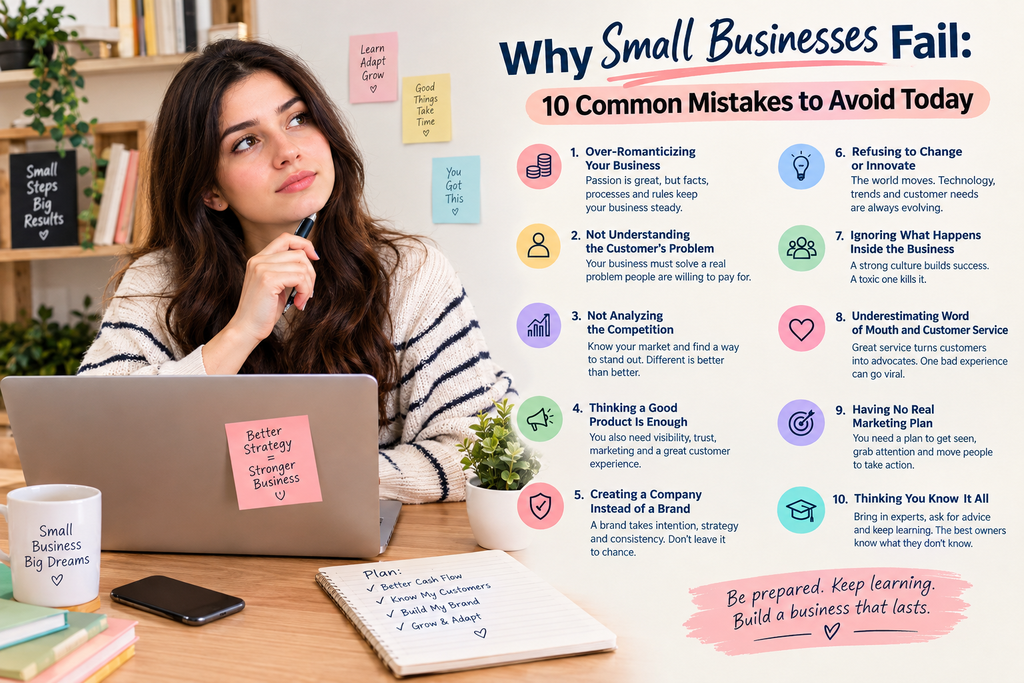
10 Common Mistakes to Avoid Today
Many people have fantasies of starting their own business. Few talk about how it often ends. Around 22 percent of startups are gone within a year. After five years, half have closed.
Knowing why small businesses fail is half the battle. The reasons are rarely mysterious. They’re usually small mistakes that pile up. Own a small business? A few of these might sting. Work with small business owners as a freelancer or agency? You’ll want to know them too.
Why Small Businesses Fail: Cash Flow Comes First
https://www.bls.gov/bdm/us_age_naics_00_table7.txt
Cash flow is the big one. Not enough money to survive the slow months after launch, and that’s it. Sales crawl at the start. Rent doesn’t care.
Money isn’t the only problem, though. Here are ten more.
1. Over-Romanticizing Your Business
Passion starts a business. It shouldn’t run one.
You’ve heard “it’s not personal, it’s just business,” usually right before something unpleasant. It’s annoying, but it’s true. Facts, numbers, processes, and rules keep a business steady. Care about it as much as you like. Just don’t let your mood make the calls.
2. Not Understanding the Customer’s Problem
Your business has to fix something people will pay to have fixed. Loving your product isn’t enough. If it doesn’t solve a real problem, it won’t sell.
And say it plainly. If customers can’t tell what you solve, they won’t act.
3. Not Analyzing the Competition
Before you sell anything, check that people actually want it. A basic business model canvas does the job. A full market analysis works too.
Then study the competition. You’re not alone in your space. Lots of others want the same customer. So how will you stand out? There’s a line for this: different is better than better. Skip this and you’ll understand why small businesses fail so quickly.
GEICO shows how it’s done. Car insurance is dull. Yet GEICO doesn’t sound like a bank. It has geckos, odd characters, and funny ads. People remember it.
4. Thinking a Good Product Is Enough
It isn’t. A good product still has to be found. That’s visibility and brand awareness.
People also need a reason to believe you. That’s authority. Testimonials and case studies add credibility, because they show you’ve done it before. Add a marketing strategy with ads, content, and word of mouth.
Then there’s customer experience. How does buying from you feel? Good service before, during, and after the sale counts for a lot.
5. Creating a Company Instead of a Brand
Registering an LLC takes minutes. Building a brand takes intention. It needs strategy and a clear set of rules, so everything you do, make, and say feels consistent.
If you don’t shape your brand, your customers will. Their experiences add up over time. So plan the experience at every step, because leaving it to chance rarely ends well.
6. Refusing to Change or Innovate
Plenty of big names learned this the hard way. Blockbuster missed streaming and DVDs by mail. Netflix didn’t. Nokia shrugged at touch screens.
Xerox invented the PC and sat on it. Then it showed the idea to Steve Jobs at Xerox PARC, and he built Apple from it. Sony created the Walkman and owned mobile music, then ignored digital files. Kodak figured people would always want film. Look how that went.
Culture keeps moving. So does technology. Even now, environmental worries and market demand are pushing cars toward electric. Standing still is another reason why small businesses fail.
7. Ignoring What Happens Inside the Business
The inside matters as much as the outside. A strong culture can decide whether a small business makes it. A toxic one kills it fast. A great one lifts it just as fast. Culture is a quiet reason why small businesses fail.
Zappos sold shoes, a commodity. In 10 years, Amazon bought it for 1.2 billion dollars. Culture and customer service did most of the heavy lifting.
The business is not a single person’s show. Educate your workers and assign them tasks. Respect them and appreciate them for what they do, and not be always complaining about them. Otherwise, you won’t be able to get their loyalty.
8. Underestimating Word of Mouth and Customer Service
Customer service is the most underrated skill in business right now. Every single interaction can multiply your growth.
The internet gave everyone a soapbox. One bad experience can turn into public shaming. One great one can send your brand soaring.
Speed matters more than ever. So does the human touch. People are fed up with chat bots, endless phone trees, and offshoring. That’s your edge as a small business. You’re small, so you can be personal.
9. Having No Real Marketing Plan
https://www.sba.gov/counseling/manage-your-business/#marketing-and-sales
A great product is only step one. You also need a plan for getting seen. Where will you show up? When? How often? No plan is one more reason why small businesses fail.
Then there’s attention. How will you grab it? How will you explain your value? And how will you move people to wherever you deliver, whether that’s a website, an online store, or a physical shop?
10. Thinking You Know It All
Confidence is useful. Thinking you know everything isn’t. Owners like that fail at much higher rates.
Owners who succeed know what they don’t know. They bring in experts for marketing, consumer research, finance, sales, design, and customer service. You don’t need full-time hires for that. Consultants can get you up to speed at a fraction of the cost, and you skip the ongoing salary and benefits.
Final Thoughts on Why Small Businesses Fail
Now you know why small businesses fail. Still, building a small business is one of the most rewarding things you can do. It puts you in charge of your own destiny.
Be prepared for what’s to come. Be always ready to learn and adapt. These are the ten mistakes to avoid if you want your small business to be successful.
