10 Proven Strategies: How to Optimize Your Home Office Setup for Maximum Productivity
I remember the first time I tried working from home full-time. I was perched on a hard wooden kitchen chair with my laptop propped up on a stack of cookbooks. By 2:00 PM, my back felt like it was in a vice, and my focus was non-existent. I realized quickly that a “home office” isn’t just a place where you put your computer; it is the engine room of your career.
If you are struggling to stay focused or ending your day with a literal headache, your environment is likely the culprit. Learning how to optimize your home office setup for maximum productivity isn’t just about buying expensive gadgets. It is about creating a space that respects your body and clears your mind. In this guide, I will show you exactly how to build a workspace that makes you want to get to work.
1. Prioritize Lighting to Reduce Eye Strain
Lighting is often the most overlooked part of a home office. If you are working in a dim room, your eyes are working overtime to see the screen and your notes. This leads to fatigue and those nasty afternoon headaches that kill your drive.
Whenever possible, position your desk near a window. Natural light is a natural mood booster and helps keep your circadian rhythm in check. However, avoid facing the window directly or having it right behind you, as this causes glare. Side-lighting is the sweet spot.
Layer Your Light Sources
Don’t rely on a single overhead bulb. Use “layering” to create a balanced environment. Start with ambient light (overhead), add task lighting (a high-quality desk lamp), and finish with accent lighting to make the space feel warm. I highly recommend a desk lamp with adjustable color temperatures. Cooler blue light is great for deep focus, while warmer yellow light helps you wind down in the evening.
2. Invest in Ergonomics (Your Future Self Will Thank You)
You might think you’re saving money by using a dining chair, but your chiropractor bills will say otherwise. When we talk about how to optimize your home office setup for maximum productivity, ergonomics is the foundation. If you are in pain, you cannot produce your best work.
Your chair should be your biggest investment. Look for one with adjustable lumbar support, armrests, and seat height. Your feet should be flat on the floor, and your knees should be at a 90-degree angle. If your feet dangle, get a footrest. It sounds small, but it changes the pressure on your lower back instantly.
The Monitor Eye-Level Rule
Stop looking down at your laptop. This causes “tech neck,” a real condition that leads to chronic pain. Your monitor should be at eye level, about an arm’s length away. If you use a laptop, buy a stand and a separate keyboard and mouse. This simple change allows you to sit upright and keeps your shoulders from hunching forward.
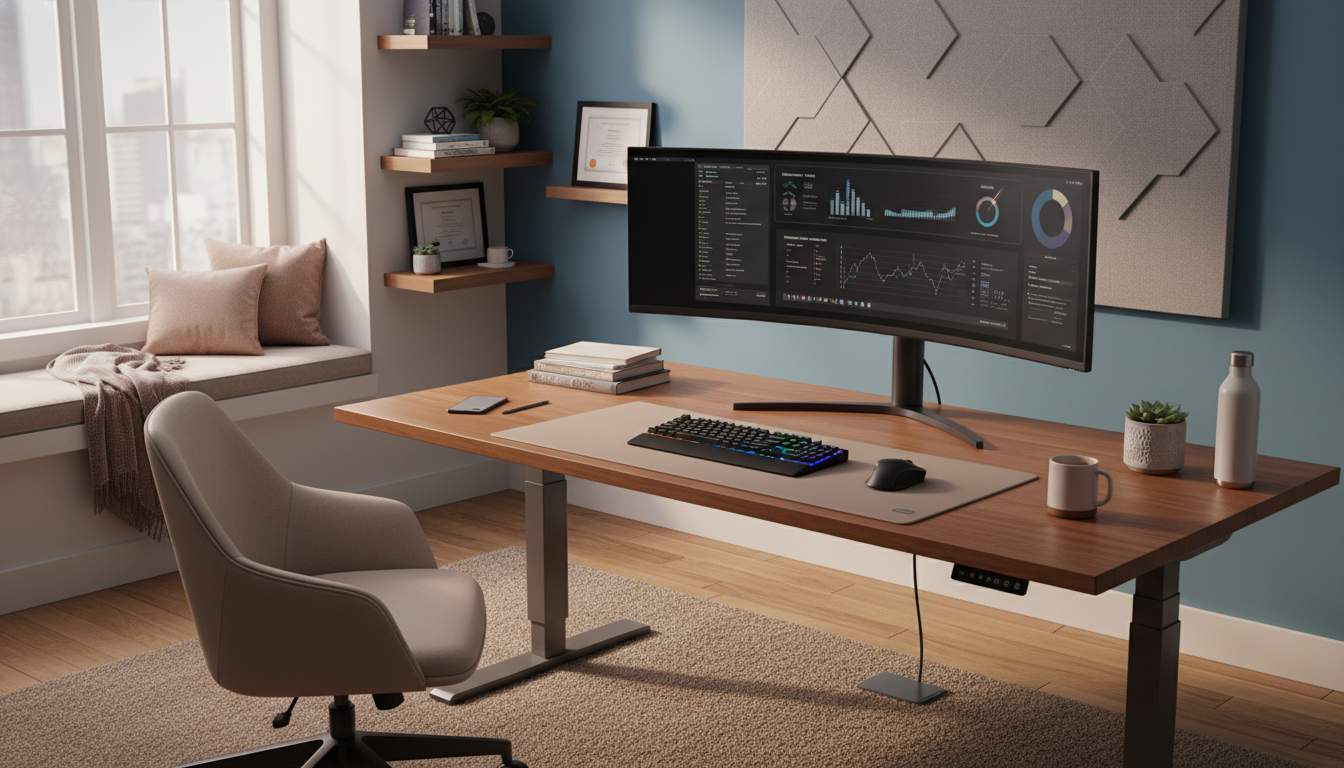
Alt-Text: Professional home office setup with ergonomic chair and dual monitors for maximum productivity.
3. Streamline Your Tech and Connectivity
Nothing kills productivity faster than a spinning loading icon. If your Wi-Fi is spotty in your office, your work will suffer. If you can, run an Ethernet cable directly to your computer. It is the only way to guarantee a stable connection for those important Zoom calls.
If a hardwire connection isn’t an option, look into a Mesh Wi-Fi system. These systems use multiple nodes to blanket your home in high-speed internet, ensuring your office isn’t a dead zone. Speed is a tool, not just a luxury.
The Magic of Dual Monitors
If you are still working on a single screen, you are missing out. Studies show that a second monitor can increase productivity by up to 40%. It allows you to have your research or email on one screen while you do your actual work on the other. No more constant tab-switching. It’s a game-changer for your workflow.
4. Conquer the Cable Chaos and Desk Clutter
A cluttered desk leads to a cluttered mind. When your workspace is covered in old coffee mugs, random papers, and a jungle of tangled wires, your brain struggles to focus on the task at hand. It creates a visual “to-do” list that distracts you constantly.
Start with cable management. Use Velcro ties or cable sleeves to group your cords together. Mount a power strip under your desk to keep everything off the floor. It looks cleaner and makes cleaning the floor much easier. A clean floor makes the whole room feel bigger and more organized.
The “One In, One Out” Rule
Keep only what you need for your current task on your desk. Everything else—staplers, extra pens, old notebooks—should live in a drawer. At the end of every day, take five minutes to clear your desk. Walking into a clean office the next morning sets a completely different tone for your workday.
5. Use Psychology to Boost Your Focus
Your environment speaks to your brain. You can use color and nature to trick your mind into being more productive. For example, the color blue is known to promote focus and calm, while yellow can spark creativity. You don’t have to paint the whole room; even a few pieces of blue desk decor can help.
Plants are another secret weapon. Adding a bit of greenery to your office isn’t just for looks. Plants like Snake Plants or Pothos are easy to care for and help purify the air. More importantly, looking at nature reduces stress levels and improves attention spans. It’s called “Biophilic Design,” and it’s a powerful tool for anyone working from home.
6. Establish Physical and Mental Boundaries
The hardest part of learning how to optimize your home office setup for maximum productivity is knowing when to stop. When your office is in your home, the lines get blurred. You might find yourself checking emails at 9:00 PM because your computer is right there.
Try to have a dedicated room with a door. If you don’t have an extra room, use a room divider or even a rug to “zone” your workspace. This tells your brain, “When I am on this rug, I am at work.” When you step off, you are at home. This mental shift is vital for preventing burnout.
The “Shutdown Ritual”
End your day with a ritual. Close all your tabs, write down your top three goals for tomorrow, and physically turn off your monitor. This signals to your nervous system that the workday is over. It allows you to actually relax and recharge, which means you’ll be more productive the next day.
7. Master Your Soundscape
Is your neighbor mowing the lawn? Is the dishwasher running? Sound distractions are productivity killers. While some people love total silence, others find it deafening. The key is to control what you hear.
Invest in a pair of high-quality noise-canceling headphones. They are worth every penny when you need to enter “deep work” mode. If you prefer background noise, try white noise machines or lo-fi music. Avoid music with lyrics if you are doing tasks that require language processing, like writing or coding, as it can interfere with your internal monologue.
Alt-Text: Noise-canceling headphones on a desk, essential for home office productivity.
8. Don’t Forget Air Quality and Temperature
If your office is stuffy or too hot, your brain will feel sluggish. Fresh air is fuel for your brain. If the weather permits, crack a window. If not, consider an air purifier. It removes dust and allergens that can make you feel tired or “foggy.”
Temperature also plays a huge role. Most people work best in a room that is between 68 and 72 degrees Fahrenheit. If you are too cold, your body spends energy trying to stay warm instead of focusing on your work. Keep a sweater or a small space heater nearby if your office tends to get chilly.
9. Incorporate Movement into Your Setup
Humans aren’t meant to sit still for eight hours. A sedentary lifestyle is the enemy of long-term productivity. If your budget allows, a standing desk is a fantastic addition. Switching between sitting and standing throughout the day keeps your blood flowing and your energy levels high.
If a standing desk isn’t an option, set a timer for every 50 minutes. Get up, stretch, and walk around for five minutes. This “reset” helps prevent the mental fatigue that sets in during long work sessions. I often use these breaks to grab a glass of water, which keeps me hydrated and focused.
10. Make It Yours (But Don’t Overdo It)
Finally, your home office should be a place you actually enjoy being in. Add some personal touches—a photo of your family, a piece of art that inspires you, or a nice candle. These small things make the space feel inviting rather than clinical.
However, be careful not to over-personalize. If your desk is covered in toys and gadgets, they become distractions. Pick two or three items that bring you joy and keep the rest of the space functional. The goal is a balance between “cozy” and “professional.”
Conclusion: Your Productivity is an Investment
Figuring out how to optimize your home office setup for maximum productivity isn’t a one-time task. It is a process of constant refinement. Start with the big things: a great chair, good lighting, and a fast internet connection. From there, tweak the small details like plants, colors, and cable management.
When you respect your workspace, you respect your work. By creating an environment that supports your body and mind, you are setting yourself up for success. You’ll find that you get more done in less time, leaving you with more freedom to enjoy your life outside of work. Now, go take a look at your desk—what is the first change you’re going to make?
Frequently Asked Questions
Q: What is the best color for a home office?
A: Blue is generally considered the best for focus and productivity. Green is great for long hours as it’s easy on the eyes, while yellow is excellent for creative roles.
Q: Is a standing desk really worth it?
A: Yes, but only if you use it correctly. The goal is to alternate between sitting and standing. Standing all day can be just as hard on your body as sitting all day.
Q: How can I hide messy cables?
A: Use cable management boxes, J-channels under your desk, or simple Velcro ties. Keeping cords off the floor makes the room look instantly cleaner.